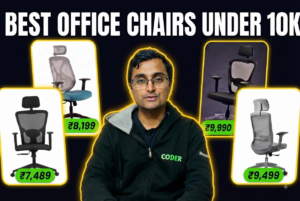
“What are the best office chairs for work from home for long hours?”

Three years ago, I remember searching for that exact term wondering if I’d ever make it to forty with this lower back.
After months of procrastination and pain, I finally decided to look for some best office chairs for long work hours.
And so I went through countless reviews and compared multiple office chair brands.
I didn’t stop there.
I even found a chair manufacturer near-by so I could try the office chairs before buying one.
After testing a few, I found a chair that felt like it had been custom-built for me.
It looked great, felt comfortable, and I was convinced my search was finally over.
However two days later, I realized the harsh truth.
I bought the wrong office chair.

Looking back, the problem wasn’t my research or even the chair itself.
The problem was: I overlooked two critical factors that reviewers rarely spoke about.
So, if you’re looking to buy the right office chair for working from home, this guide will help you:
- Avoid spending thousands on a bad office chair.
- Understand the 9 key features of a good office chair.
- How much should you spend on an office chair.
- My 10 best office chairs recommendations for work from home.
If that sounds useful, keep reading.
If you’re only looking for chair recommendations, you can also jump straight to my curated list of office chairs here (Google Sheet).
And if you enjoy this guide, consider subscribing to my YouTube channel for more work-from-home tech reviews and ergonomic setup tips.
What To Look Out For When Buying an Office Chair?
Before comparing office chair brands, reviews, or ergonomic features, ask yourself these two questions. They’ll help you avoid the same mistakes I made.
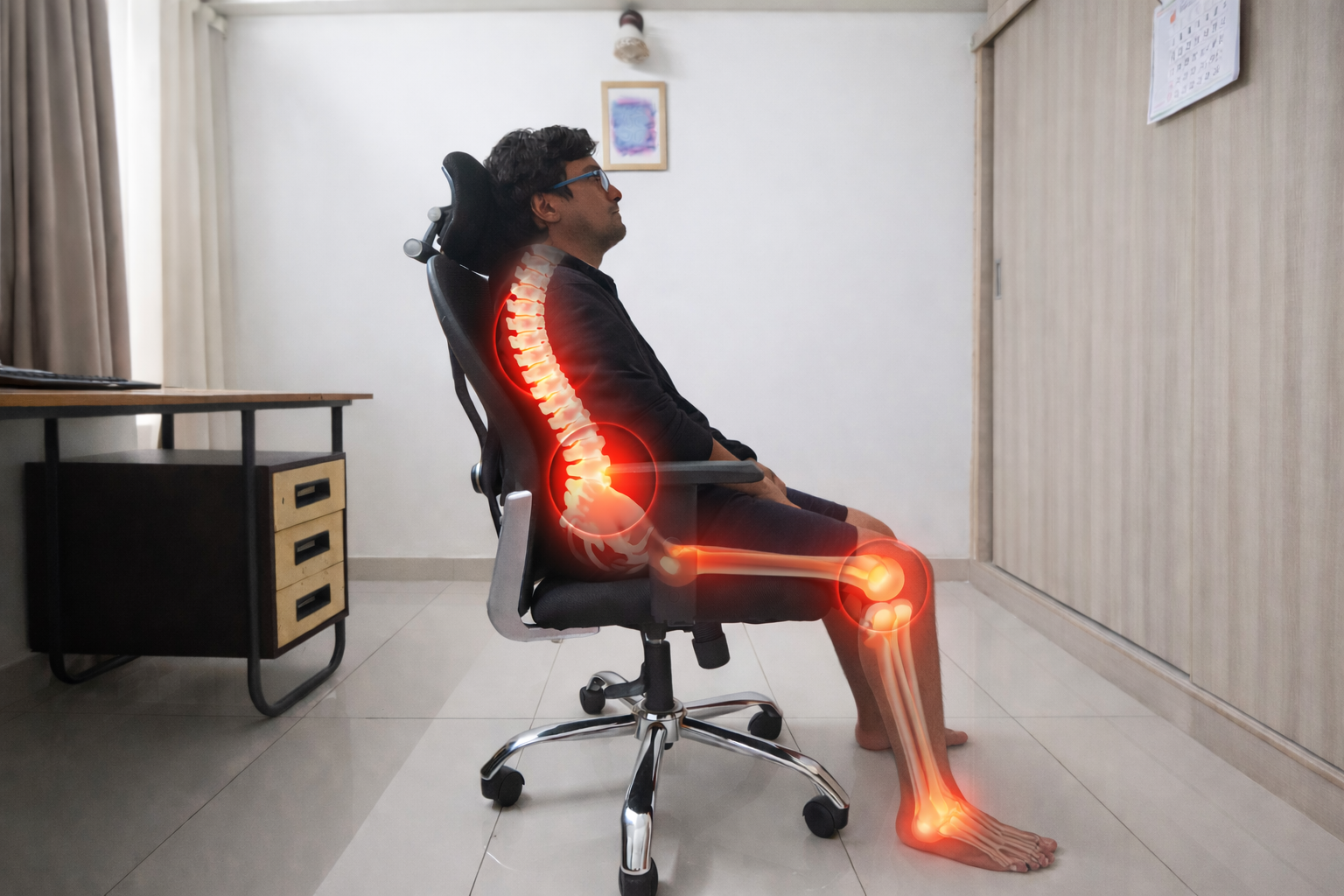
#1: Is this office chair good for my body’s natural curve?
I’m 5’2″, but the chair I bought was designed for someone with a larger frame.
Because of that, the lumbar support sits higher than the natural curve of my lower back. Instead of supporting my spine, it pushes against the wrong spot and actually causes lower back pain.
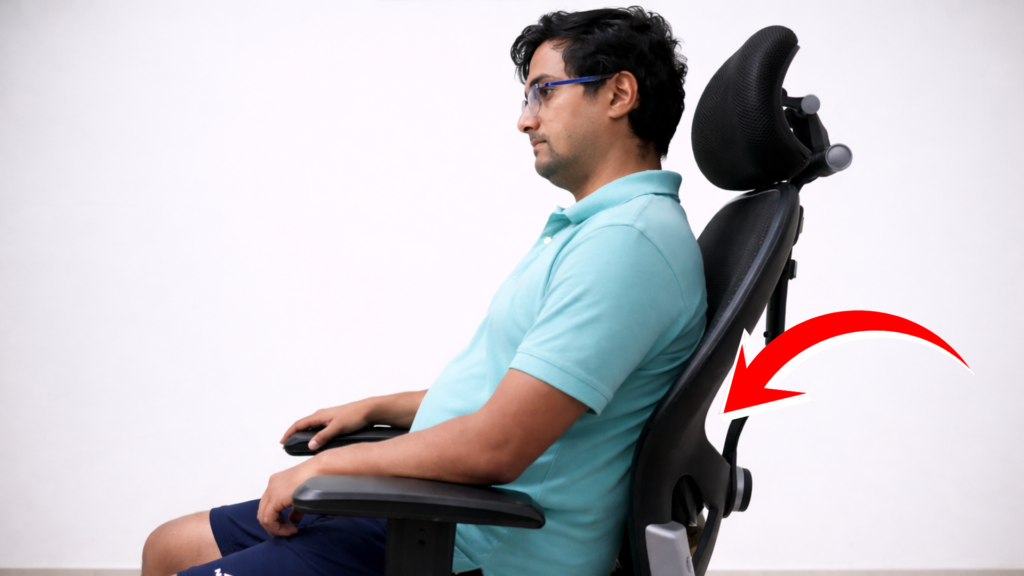
This is important to note. You need a chair that fits your body’s natural curve.
We’ll cover how to check that in the next section.
#2: Is the office chair too wide for the table?
Before buying an office chair, check whether it can actually fit under your desk.
This is especially important if your desk has fixed side cabinets or drawers like mine.
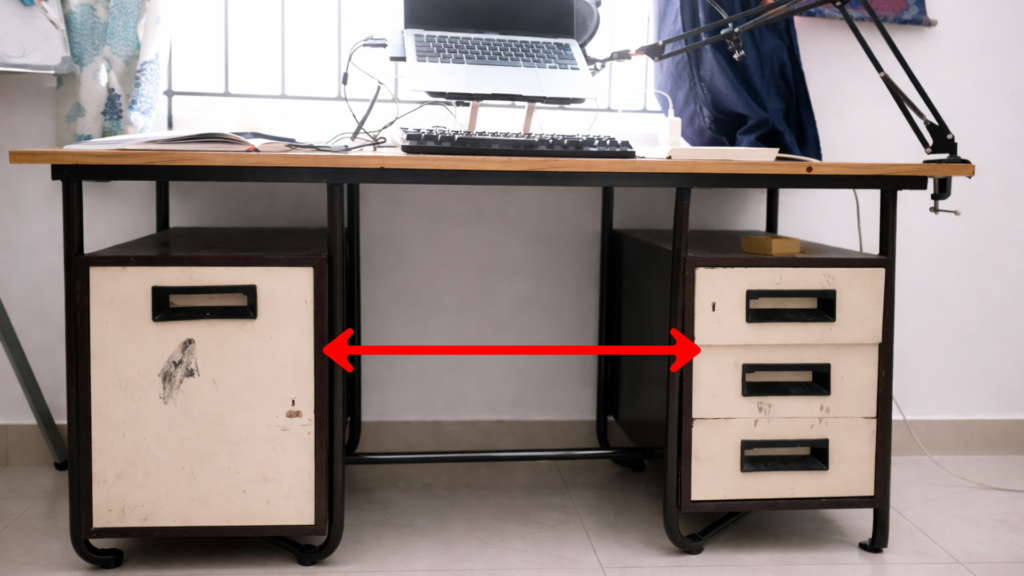
The chair needs to be narrower than the opening under the desk.
I learned this the hard way.
My chair was wider than the space under my desk, so it couldn’t slide in completely. That meant I had to sit farther away from my laptop all day.
It doesn’t sound like a big deal, but over time it forces you to reach forward, putting extra strain on your shoulders, elbows, neck, and lower back.
A good ergonomic setup follows what’s commonly called the 90-90-90 rule.
- Your elbows should be bent at roughly 90° while typing.
- Your hips and knees should also be close to 90°.
- Your feet should rest flat on the floor (or on a footrest).
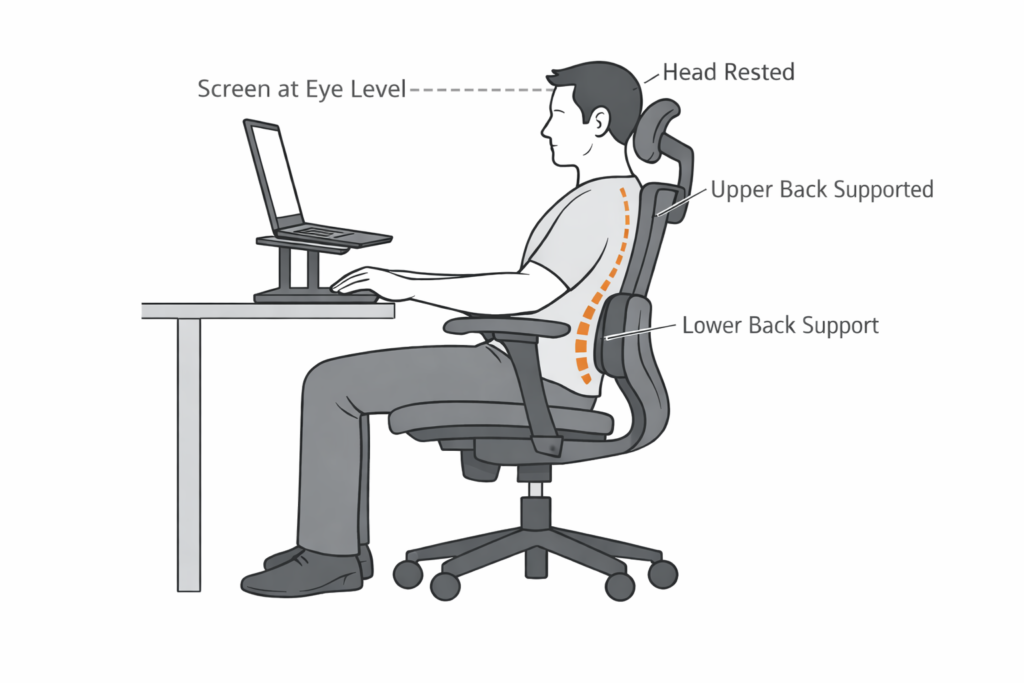
This isn’t a rule you have to follow perfectly, but if your chair can’t slide close enough to your desk, maintaining this position becomes much harder.
What Features Should I Look For In An Office Chair?
Now that you know what chair mistakes to avoid, let’s look at the features that actually matter.
Starting from the wheels and working our way up, here’s what to look for before buying an office chair.
Best Office Chair For Work From Home – Ideal Feature Checklist
| Feature | Preferred |
| WheelBase & Wheels | Nylon Wheels, 55-60cm |
| Seat Height | Adjustable: 52-60cm |
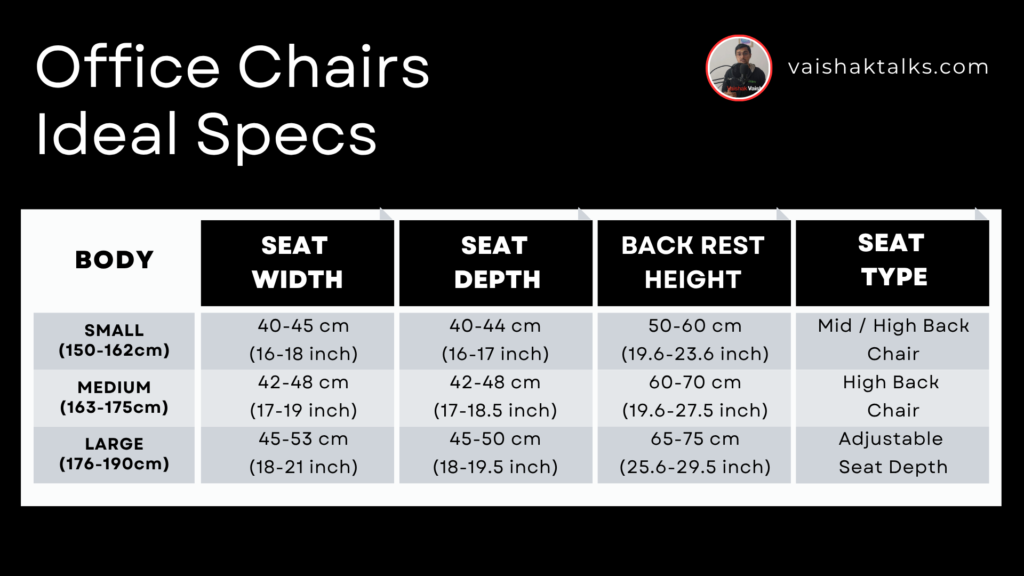
| Seat Width (For S,M, L body types) | S:40-45cm , M:42-48cm, L:45-53cm |
| ArmRest | Adjustable: 2D or more |
| Seat Depth (For S,M, L body types) | S:40-44cm, M: 42-48cm, L:45-50cm |
| Seat Cushion | Contoured Memory Foam Cushions |
| Lumbar Support | Partially or Fully Adjustable |
| BackRest Height (For S, M, L body types) | S:50-60cm, M:60-70cm, L:65-75cm |
| Chair Material | Mesh Material. (AC60 or AC70 mesh type) |
1. Wheel base and wheels
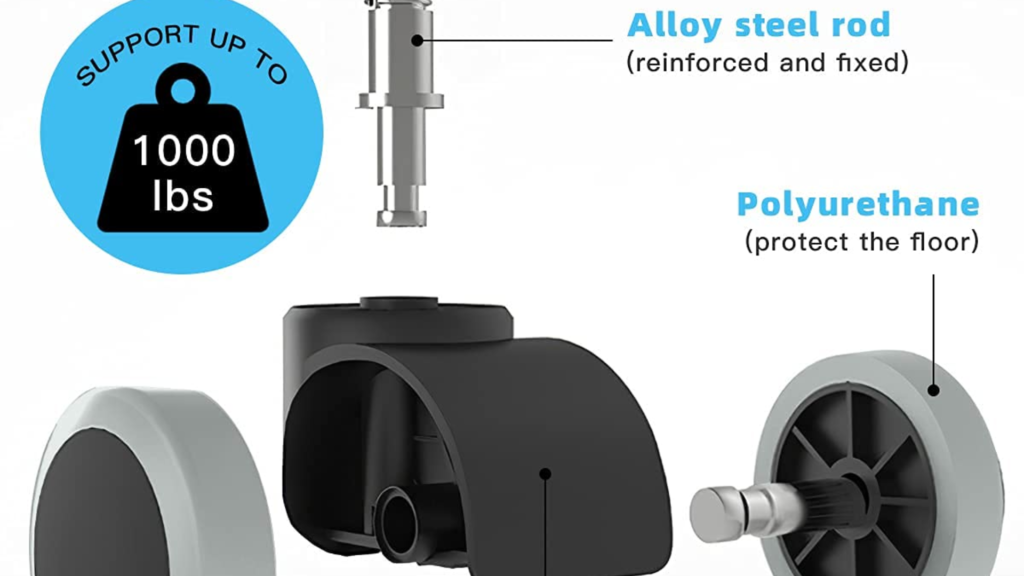
Wheelbases come in plastic, nylon or steel material.
For work-from-home use, choose a nylon wheelbase. It’s durable, lightweight, and unlike steel, won’t rust over time.
For the wheels, look for 55–60mm casters with a nylon or PU (polyurethane) coating. Larger wheels roll more smoothly and quietly on hard floors like tiles and granite.
2. Seat Height
Seat height lets you position your body correctly relative to your desk. When adjusted properly, it helps you:
- Keep your elbows level with your desk while typing.
- Maintain roughly a 90° angle at your hips and knees.
- Rest your feet comfortably on the floor.
Your chair should have an adjustable seat height so you can position yourself correctly relative to your desk.
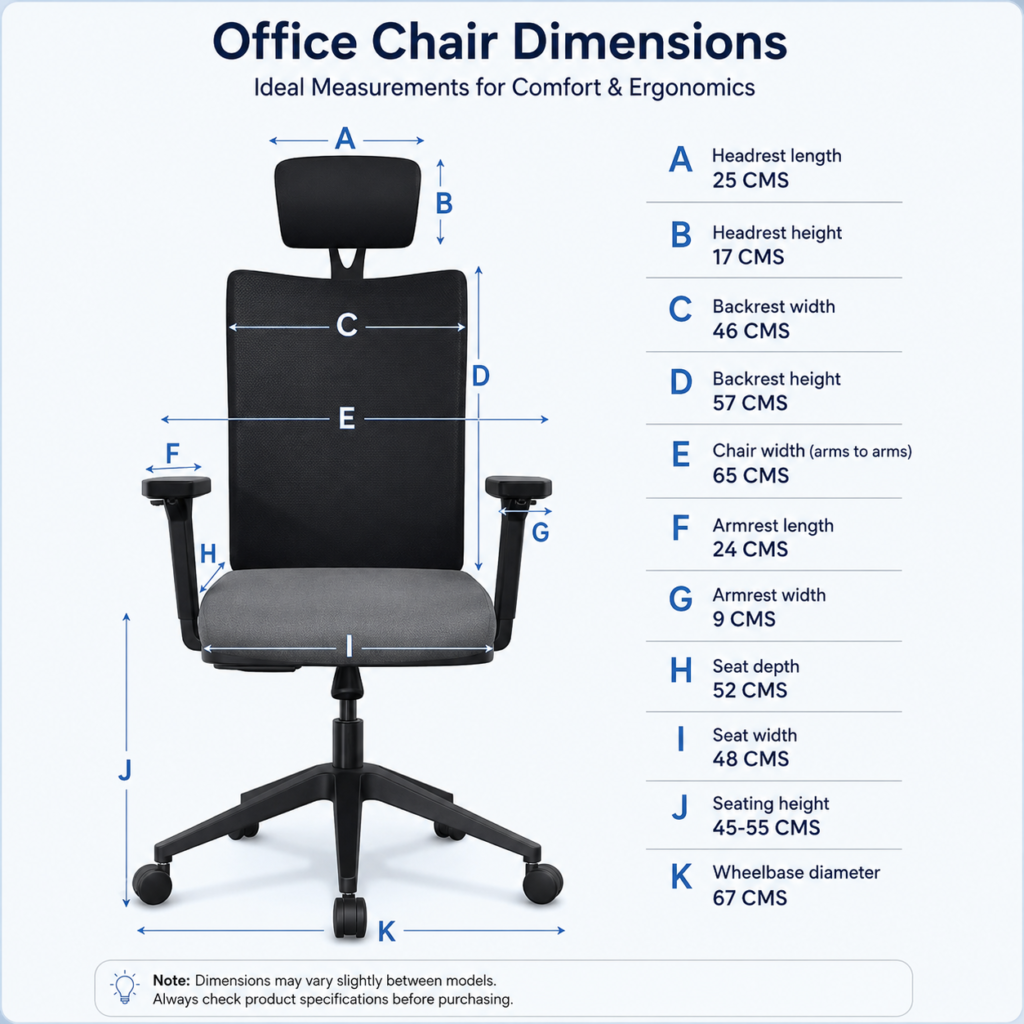
Most office desks are around 75 cm high, so as a rule of thumb, look for a chair with a seat height adjustment range of around 50–55 cm.
Make sure your feet rest flat on the floor. If they don’t, use an inclined footrest to support your feet while maintaining the correct sitting posture.
Finally, position your laptop screen at eye level. If you’re using a laptop, use a laptop stand or an external monitor to raise the screen.
Read More: Best Laptop Stands for Work from Home In India 2026
3. Seat Width
Seat width is the distance from one armrest to the other.
Below is the reference image that shows you the ideal seat width you need to go for depending on your body size.
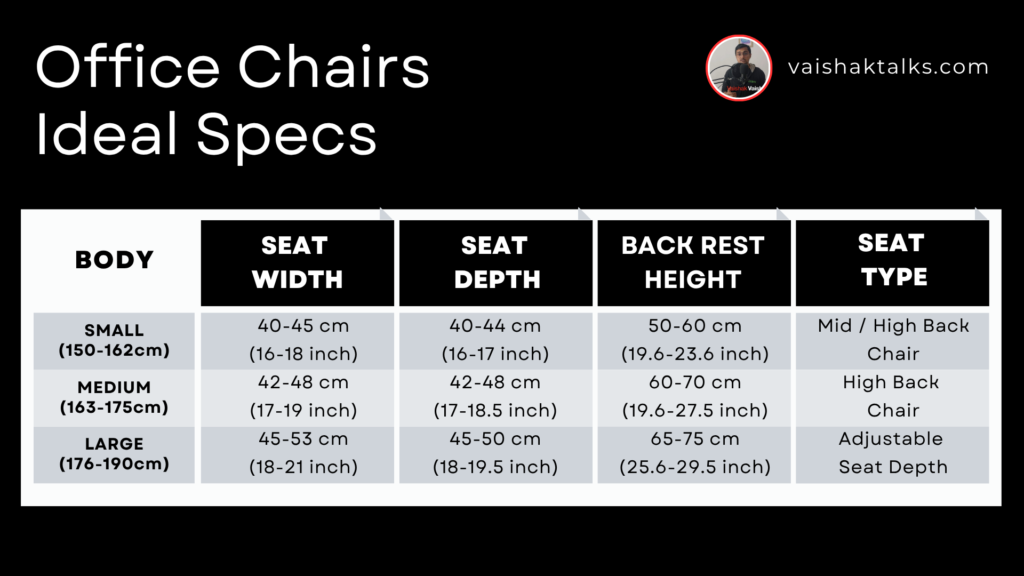
As mentioned earlier, make sure the overall chair width is narrower than the opening under your desk, especially if your desk has fixed drawers or side cabinets.
I learned this the hard way.
My chair was too wide to slide under my desk, so I had to sit farther away from my laptop. I eventually switched to this portable table from Qara, which let me bring the laptop closer and maintain a much better sitting posture.
4. Armrests (Fixed vs Adjustable)
Armrests help support your forearms while typing, reducing strain on your shoulders, elbows, and wrists.
Office chairs generally come with either fixed or adjustable armrests.
Fixed armrests, like those on the Cellbell C104, are more affordable and work well if they align with your desk height and don’t prevent the chair from sliding under your desk.
However, if the armrests are too high, too low, or prevent the chair from getting close enough to your desk, your posture will suffer. That’s where adjustable armrests make a big difference.
Adjustable armrests come in different types:
- 1D: Up and down
- 2D: Up and down, forward and backward
- 3D: Up and down, forward and backward, inward and outward
- 4D: Up and down, forward and backward, inward and outward, plus pivot/rotation
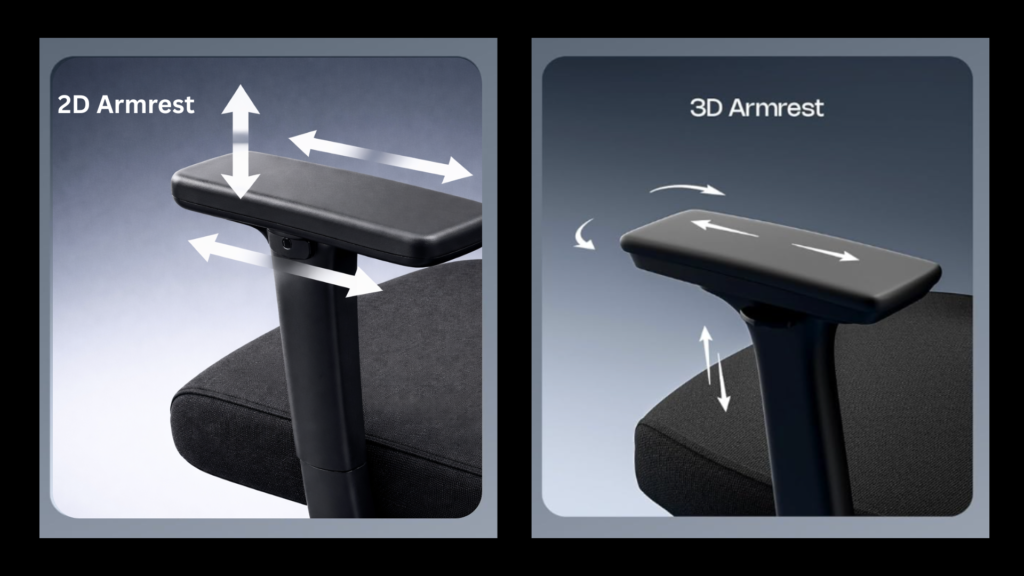
As the level of adjustment increases, so does the price of the chair.
The chair I bought had 1D armrests. Looking back, I’d recommend choosing a chair with at least 2D adjustable armrests. They give you enough flexibility to position your chair comfortably relative to your desk without paying a premium for features most people rarely use.
5. Seat Depth (Critical for comfort)
Seat depth is the distance from the front edge of the seat to the backrest.
The correct seat depth lets you:
- Sit with your back fully against the backrest.
- Support most of your thighs.
- Maintain a 2–3 finger gap between the front edge of the seat and the back of your knees.
If the seat is too deep, the front edge presses against the back of your knees, making it difficult to sit all the way back. If it’s too shallow, your thighs won’t be fully supported, causing discomfort during long hours of sitting.
If you’re small to medium build, a seat depth of around 44–48 cm is generally a good fit.
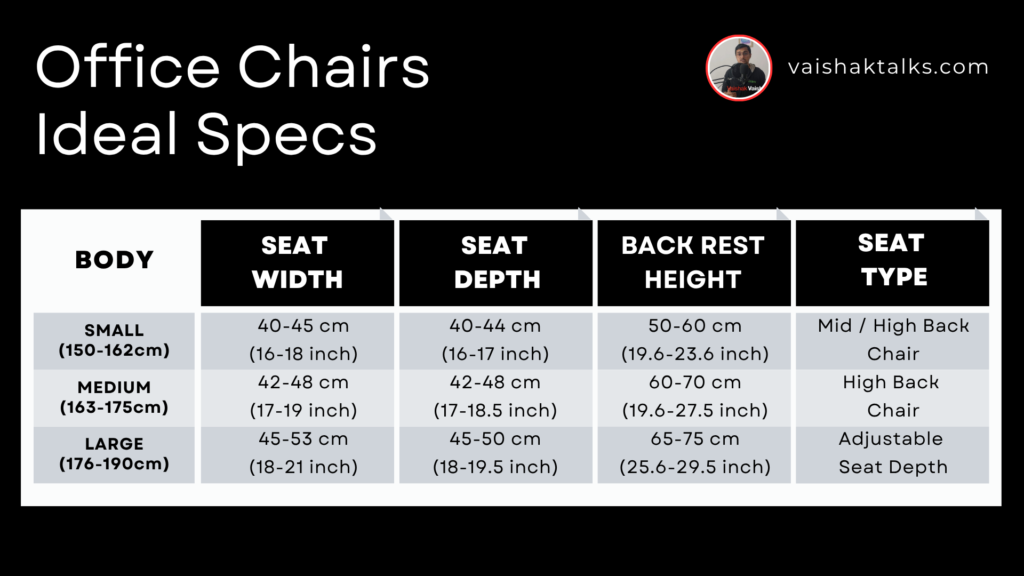
If you’re taller or have longer thighs, look for a chair with adjustable seat depth. This lets you slide the seat forward or backward so your thighs are properly supported without putting pressure behind your knees.
6. Seat cushion
The seat cushion is what supports your body weight for hours at a time. A good cushion distributes pressure evenly across your hips and thighs, making long work sessions much more comfortable.
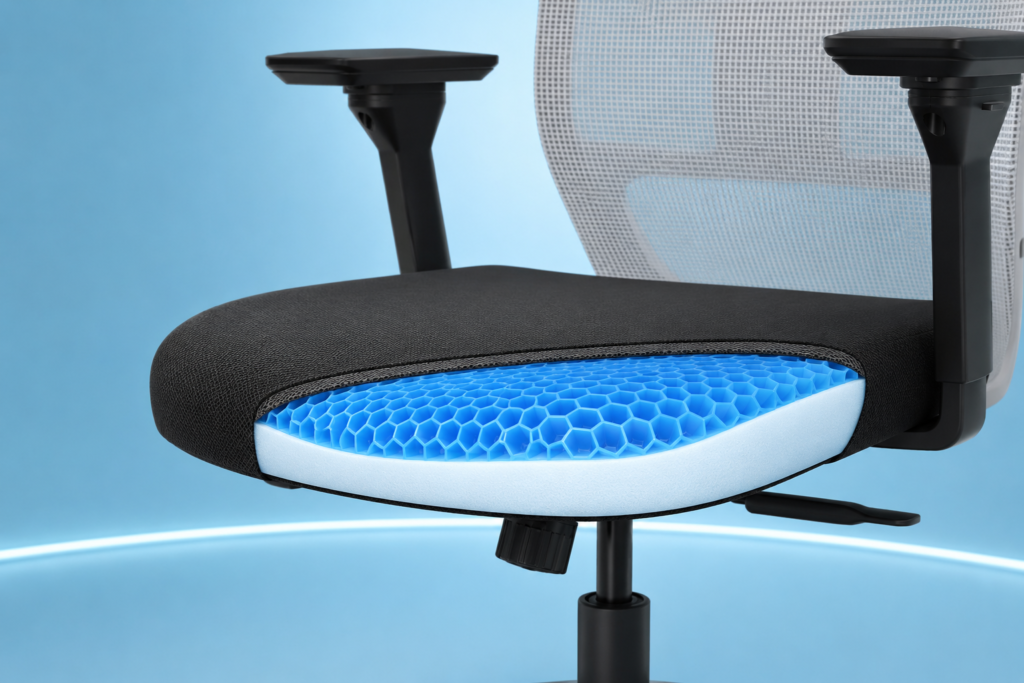
Cheaper office chairs often use low-density foam that feels comfortable at first but quickly compresses under your weight. Over time, this creates pressure points that can cause discomfort and numbness.
Instead, look for a chair with a high-density foam or memory foam cushion. These retain their shape better and provide more consistent support during long hours of sitting.
If possible, choose a cushion with a slightly contoured design. It helps distribute pressure more evenly and improves airflow, keeping you cooler throughout the day.
7. Lumbar Support (Most important)
If you only pay attention to one feature when buying an office chair, make it lumbar support.
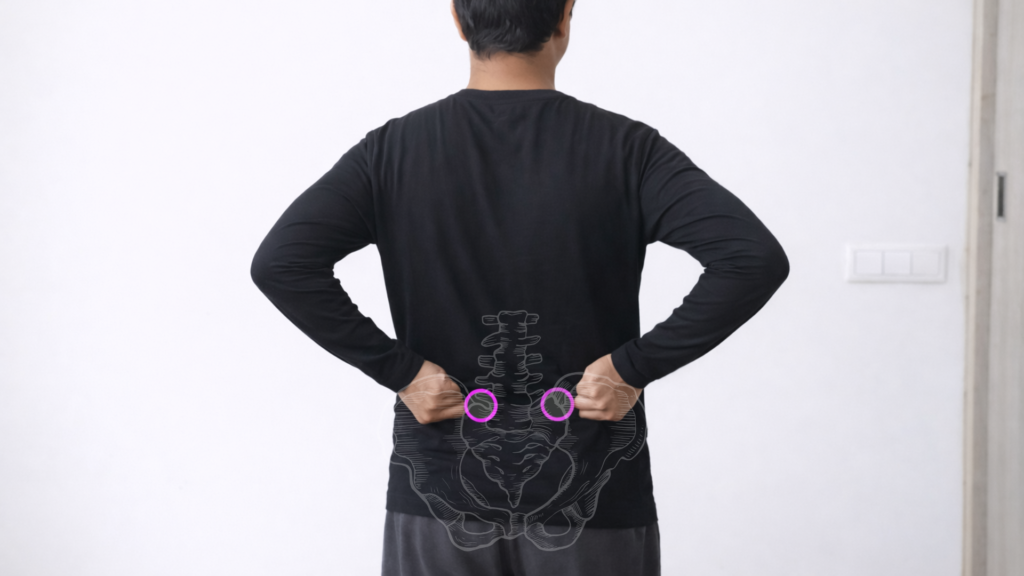
The lumbar support is designed to maintain the natural curve of your lower back. Without proper support, it’s easy to slouch, flatten your lower back, and place unnecessary strain on your spine during long hours of sitting.
Since everyone’s body is different, the lumbar support should be adjustable in two ways:
- Depth adjustment – Lets you move the lumbar support in or out so it matches the natural curve of your lower back.
- Height adjustment – Lets you position the lumbar support at the correct height for your body.
As a rule of thumb, the lumbar support should rest just above your hips, around the top of your pelvis. If it’s too high or too low, it won’t properly support your lower back.
8. Backrest Support (Beyond Lumbar Support)
A good lumbar support alone isn’t enough. The rest of the backrest should continue supporting your spine all the way up to your shoulders.
If your mid-back isn’t supported properly, you’ll gradually start slouching, causing your spine to move away from its natural position. Over time, this can lead to discomfort and fatigue during long work sessions.
Based on the backrest height, office chairs are generally available in three types:
- Low-back chairs – Support only your lower back.
- Mid-back chairs – Support your lower back, mid-back, and shoulders.
- High-back chairs – Support your entire back, including your head and neck.
For long work-from-home hours, I recommend avoiding low-back chairs. Instead, choose:
- A mid-back chair, like the Featherlite Amaze, if you’re small to medium build and don’t need head support.
- A high-back chair, like the Green Soul Jupiter, if you prefer full back, neck, and head support during long work sessions.
You can refer to the image below for the recommended backrest height based on your body size.
9. Chair Material (Mesh vs Seat Material)
The last thing to consider is the chair material.
For the backrest, I recommend a mesh chair over a leather or gaming-style chair. Mesh offers better airflow, keeps your back cooler during long work sessions, and generally provides better ergonomic support.
If you’re buying a mesh chair, you’ll commonly come across AC60 and AC70 mesh.
- AC60 is the most common option and offers good durability and breathability.
- AC70 is a higher-grade mesh with better airflow and is usually found on more expensive chairs.
Finally, pay attention to the seat cushion material.
While mesh seat cushions look premium, they can be difficult to clean. Instead, I recommend a high-density foam cushion with a fabric cover. It’s easier to maintain while still providing good comfort for long hours of work.
How Much Should You Spend on an Office Chair?
The amount you should spend depends on how many hours you sit on an office chair each day.
If you work from home for 6–10 hours a day, a good ergonomic chair is one of the best investments you can make.
While ₹10,000–₹20,000 may seem expensive at first, you’ll likely spend more time sitting in your chair than on your sofa or dining chair.
As a general guideline:
| Budget | What to Expect |
| ₹5,000–₹10,000 | The sweet spot for most people. You’ll get features like adjustable armrests, better lumbar support, high-density foam cushions, and higher build quality. |
| ₹10,000–₹15,000 | Better ergonomics with features like seat sliders, multi-lock recline, improved adjustability, and more durable materials for long-term comfort. |
| Above ₹15,000 | Best suited for people with specific ergonomic requirements, such as taller users, larger body types, or those looking for premium office chairs |
But, What If You Can’t Afford an Office Chair Right Now?
If ₹5,000–₹10,000 isn’t within your budget right now, don’t worry. I was in the same situation when I started working from home.
So, here’s what I would suggest.
Get yourself a coccyx seat cushion like this one from Grinhealth.
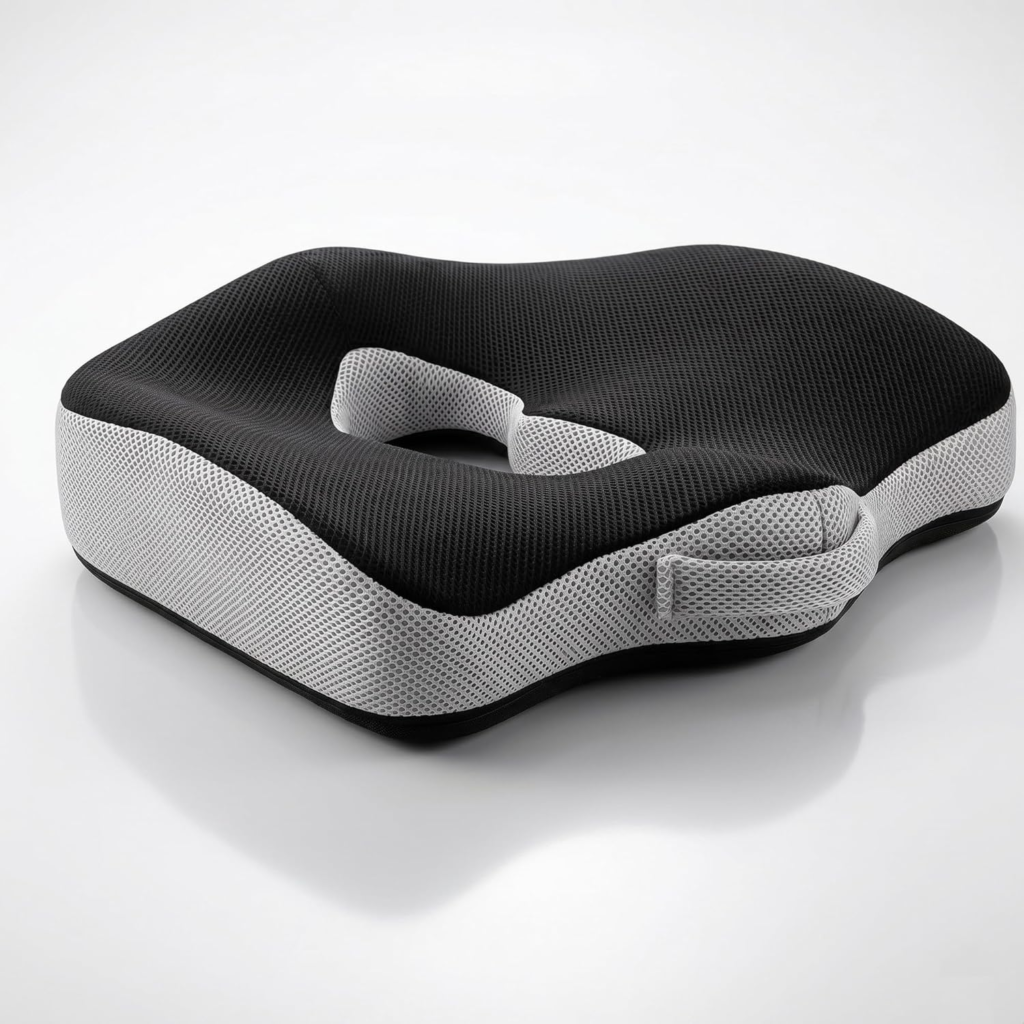
You can place this on any regular chair. The contoured design and tailbone cut-out reduces pressure on your hips and makes long sitting sessions much more comfortable.
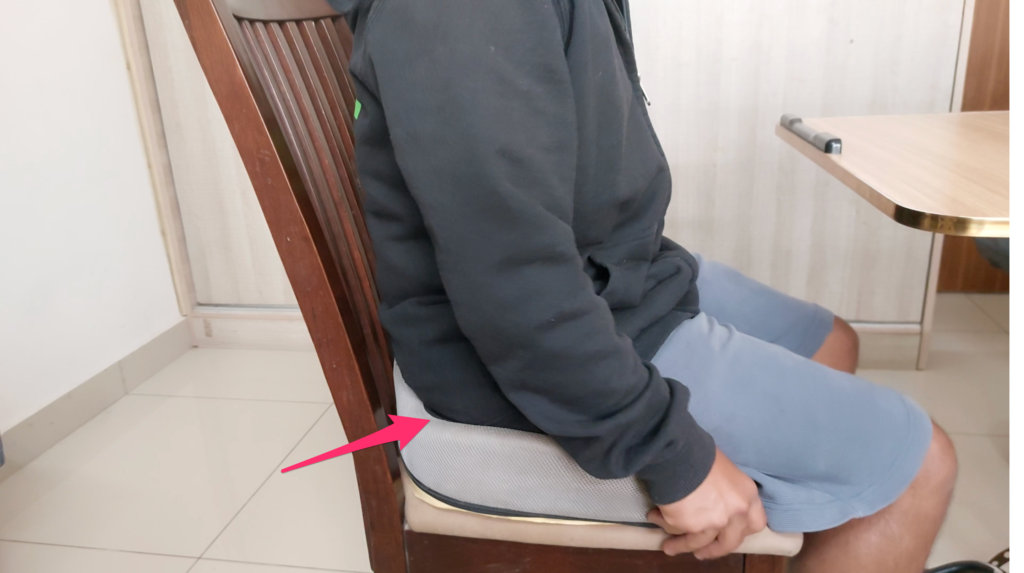
You can try this setup until you can afford a proper ergonomic office chair. Cost: ~ ₹1,700.
Now, with that out of the way, let’s look at the best office chairs for work from home and find out which ones are best for long hours.
Best Office Chairs For Work From Home Long Hours – Recommendations
Disclaimer: Every chair recommended below can help you maintain better posture during long work hours. However, no office chair can offset the effects of sitting continuously for 8–12 hours. Make it a habit to stand up, stretch, or walk for a few minutes every hour. Your body is designed to move.
Note: Prices are approximate and may change during sales or promotional periods.
If you’re upgrading from a basic office chair and want something that you can comfortably use for long work hours, these are the chairs I would look at.
I’ve picked these based on the things that actually matter when you sit for 6–10 hours a day — lumbar support, seat comfort, adjustability, armrests, seat depth and how well the chair fits your body.
Read More: Top 5 Best Office Chairs Under ₹10,000 For Long Work Hours
Best Budget Option for Small to Medium Builds
There are 2 chairs I’d recommend for small to medium builds between 5 and 5.6″.
1. Wakefit Gravitas Single Lock — Best Budget Option
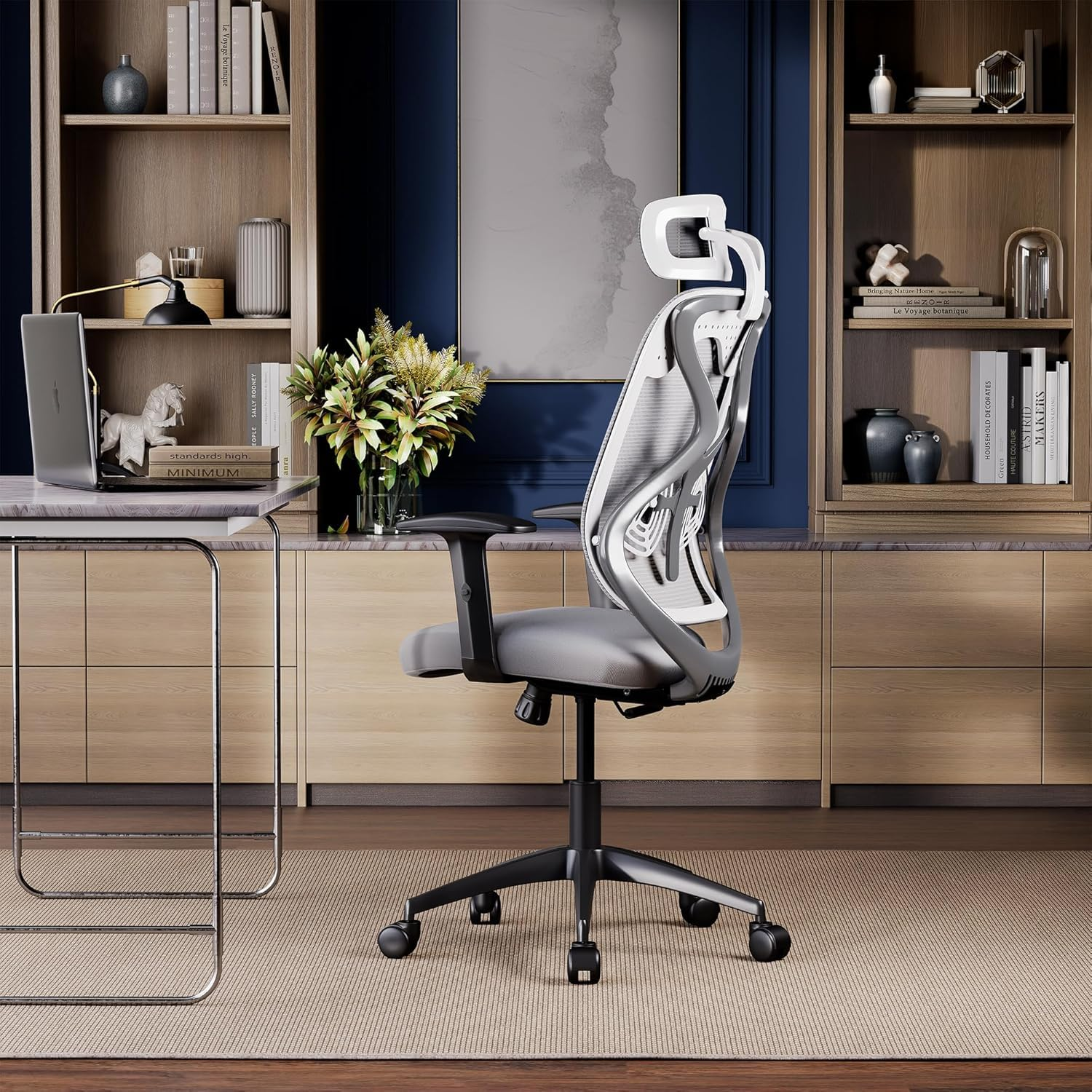
Wakefit Gravitas Single Lock
If you’re looking for something around ₹7,000, the Wakefit Gravita is a good place to start.
It offers the best overall balance of ergonomics, comfort, and value. Here’s why it comes out on top:
- 3D adjustable armrests provide better elbow and shoulder support
- 2.5-inch high-density injection-moulded foam should retain its shape longer than standard foam cushions.
- Height-adjustable lumbar support allows you to position the lumbar support to match your spine.
The combination of the mesh back and foam seat makes it a practical option for long work sessions, especially if you’re coming from a basic fixed office chair.
2. Featherlite Amaze — Best Mid-Range Option
If your budget is closer to ₹11,000–₹13,000, the Featherlite Amaze is another chair worth considering.
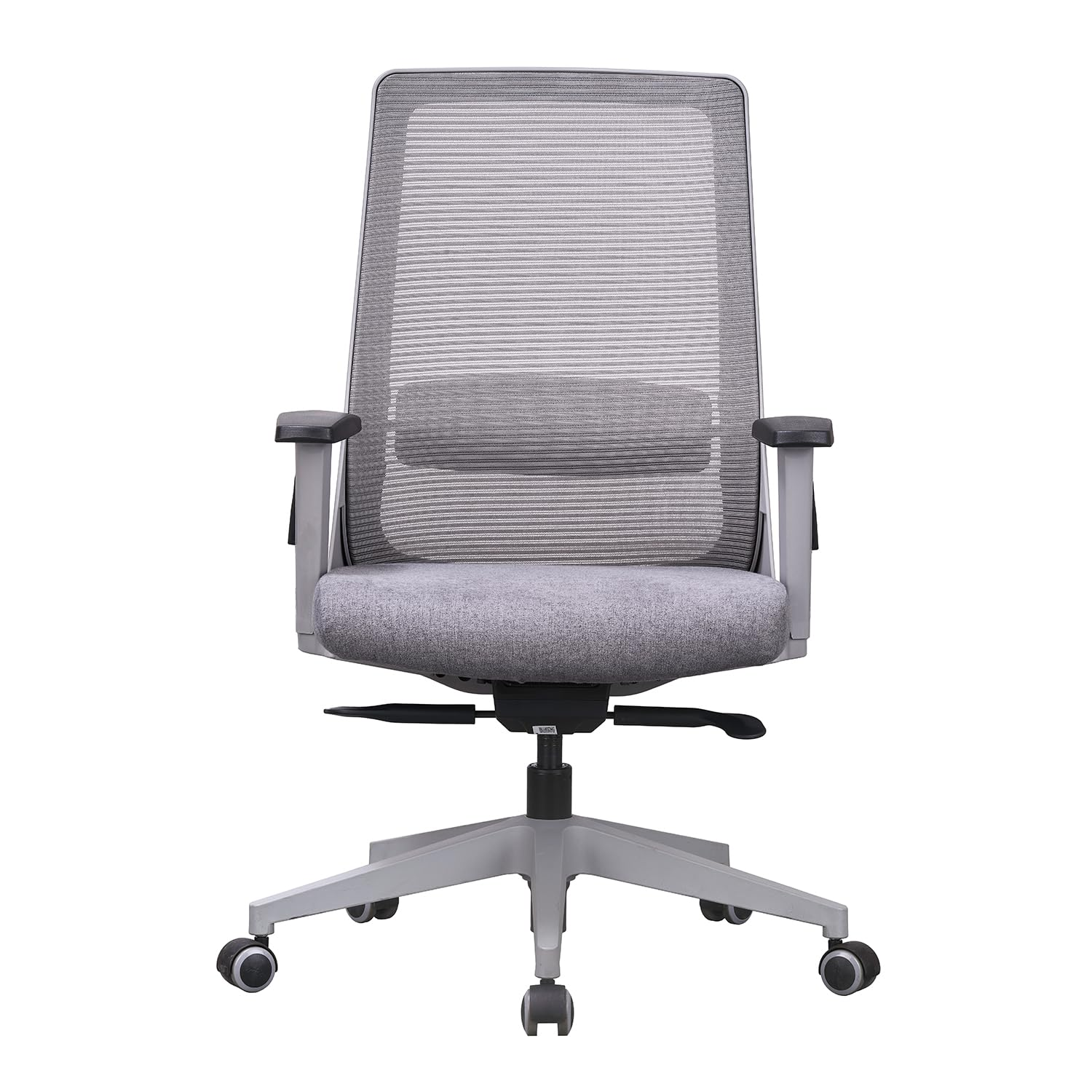
Featherlite Amaze
Its biggest strength is the adjustable lumbar support.
You can adjust the lumbar support independently to better match your lower back.
You also get a 2.5 inch form seat cushion and a breathable AN70 mesh which is particularly useful when you’re sitting for several hours at a time.
Overall, The Amaze is a chair you can consider if you’re have the budget.
Best Budget Option for Medium to Large Builds
If you’re on the medium to large body type (above 5.7″ – 5.11″), these are the chairs to consider.
1. Green Soul Jupiter Superb — Best Option Around ₹8,000–₹10,000
If you can stretch your budget a little, the Green Soul Jupiter Superb is one of the options I’d consider around the ₹8,000–₹10,000 range.
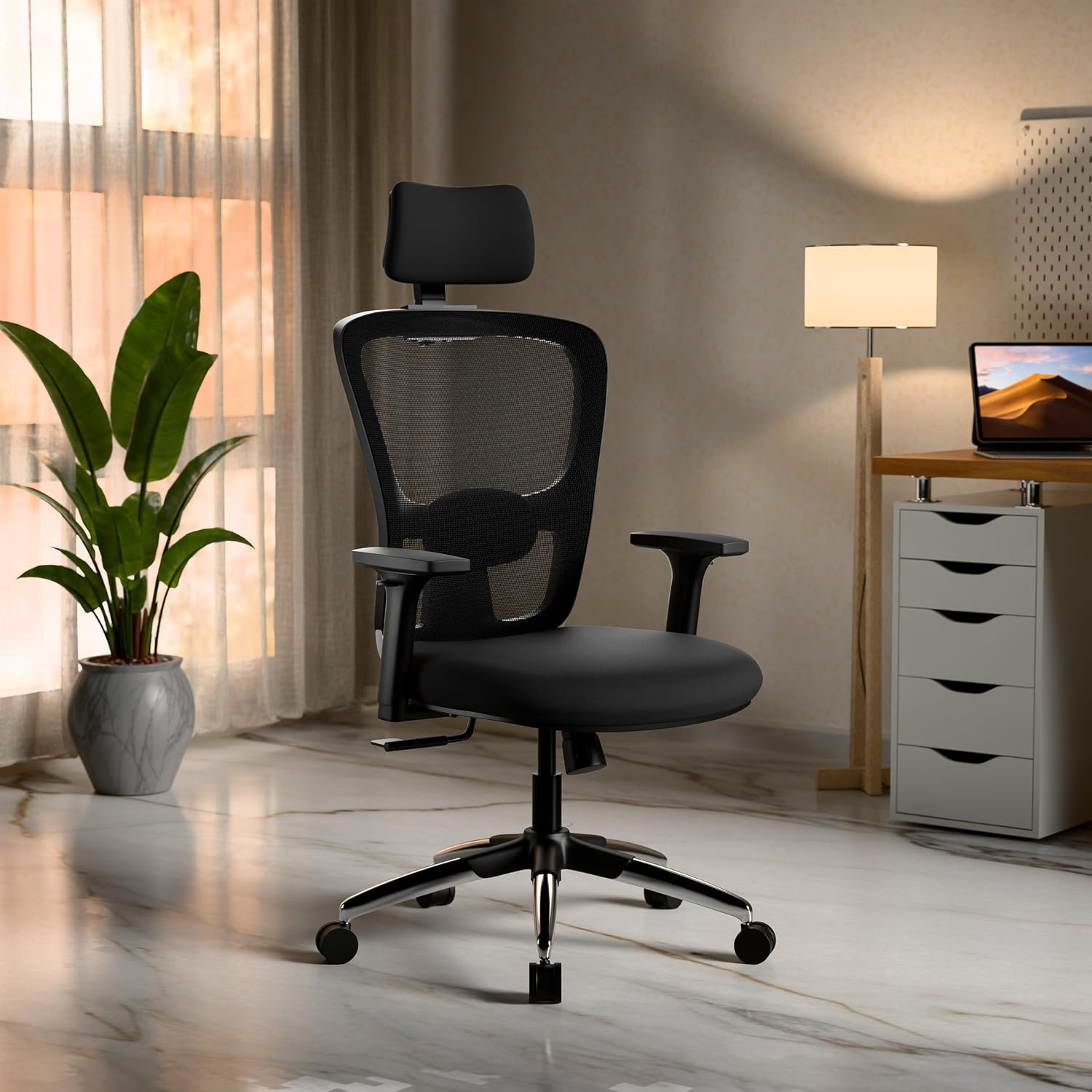
Green Soul Jupiter Superb
The main reason is the combination of its molded foam seat, adjustable lumbar support and reclining mechanism.
The lumbar support is particularly useful because you can adjust it 2 ways (up and down, in and out) to better match the position of your lower back instead of having a completely fixed support.
You also get a multi-lock tilt mechanism, so you can recline the chair and lock it at different positions (90 – 135 degrees) when you want to change your posture during the day.
This is a good option if you want more adjustability without jumping straight into the ₹12,000–₹15,000 range.
One caveat: check the current price before buying. The Jupiter Superb’s current pricing varies by version and listing, and Green Soul currently lists different Jupiter variants at different prices.
2. The Sleep Company Orthopedic Chair — Another Option Around ₹10,000–₹12,000
Another option in this price range is the Sleep Company Orthopedic Chair.
Sleep Company Onyx
It comes with adjustable lumbar support, head and neck support, 2D adjustable armrests and a SmartGRID seat cushion.
The main reason I’d consider this one is if you prefer a chair with a more cushioned seat and additional head and neck support.
Again, this is better suited to small to medium builds based on the way I’d position these recommendations.
Best Budget Office Chairs for Large Body Types
If you’re on the bigger or heavier side (6 feet and above), I would recommend these 2 chairs
1. Green Soul Jupiter Pro— Best for Bigger or Heavier Builds
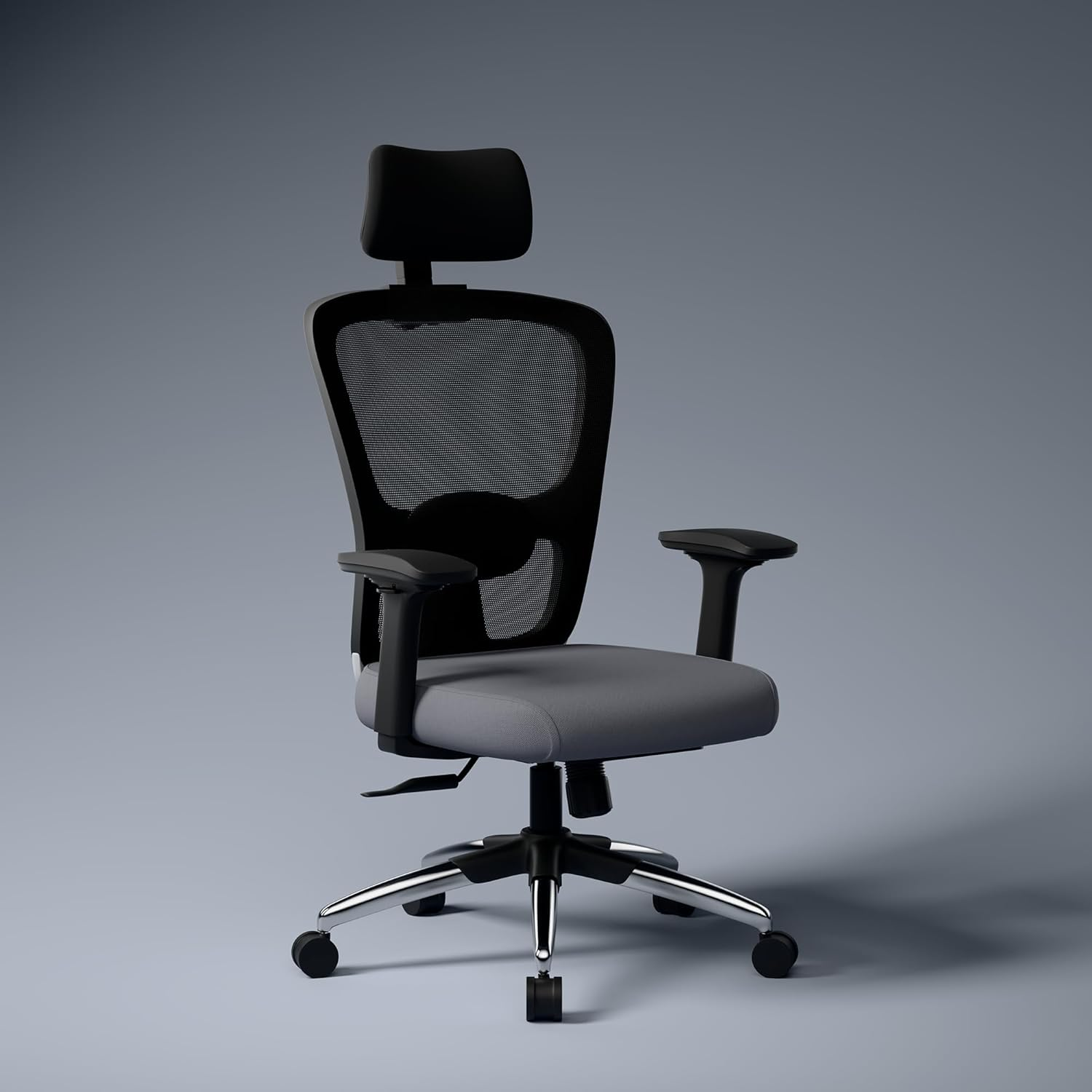
Green Soul Jupiter Pro
The biggest advantage is the 2D lumbar support and adjustable seat depth.
If you have longer thighs, a seat that is too short can leave part of your legs unsupported. A seat-depth adjustment lets you position the seat better under your thighs.
You also get wider seating and adjustable armrests, which can make a noticeable difference if you’re physically larger.
If you’re struggling to fit comfortably into narrower office chairs, this is one I’d look at.
2. Kepler Brooks Eterna
Another option for bigger builds is the Kepler Brooks Eterna.
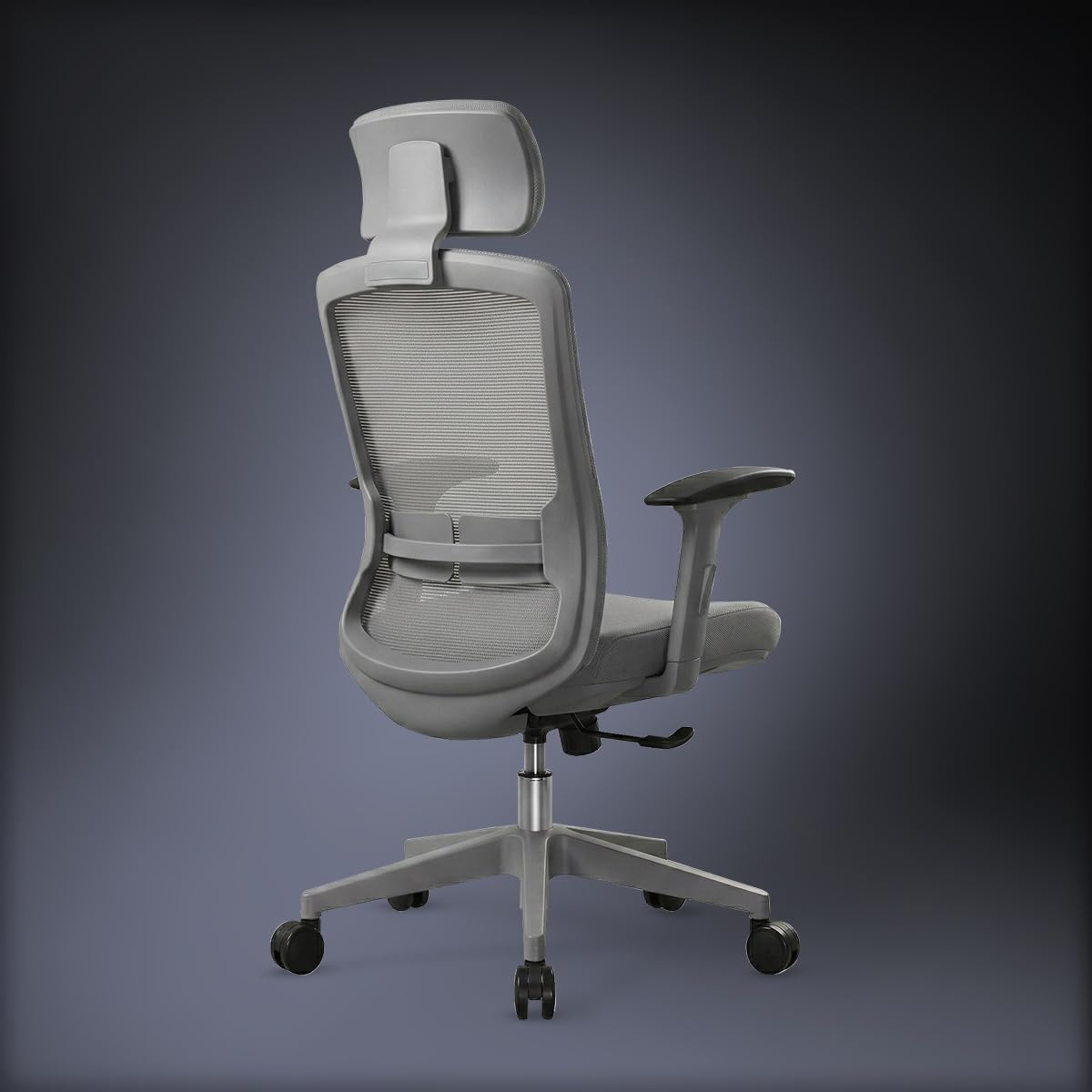
Kepler Brooks Eterna
This chair is designed with broader backs and longer thighs in mind, and you get features such as adjustable seat depth, multi-lock tilt and 3D adjustable armrests.
You get a height-adjustable foam padded headrest for neck support and proper angular alignment.You also get a 45D molded foam seat that makes it ideal for long working hours.
Best Office Chairs For Work From Home Long Hours FAQ’s
What is the best office chair for home use?
The best office chair for home use depends on your body size, budget, and how many hours you sit each day. Look for a chair with adjustable lumbar support, adjustable armrests, a comfortable seat cushion, a breathable mesh backrest, and a stable wheelbase.
If you’re looking for a recommendation, I found the Green Soul Jupiter Pro to be the best office chair under ₹10,000. If your budget is higher, the chairs recommended in the ₹10,000–₹20,000 section are also excellent options.
What chair is best for sitting for long hours?
For sitting six to ten hours a day, choose an ergonomic office chair with adjustable lumbar support, adjustable armrests, a high-density moulded foam seat cushion, and a breathable mesh backrest.
Just as importantly, make sure the chair fits your body. Even the best ergonomic chair won’t be comfortable if the lumbar support sits too high or the seat is too deep.
Remember to stand up, stretch, or walk around for a few minutes every hour.
What type of chair is best for office work?
An ergonomic office chair is the best choice for office work. It helps maintain a natural sitting posture and reduces strain on your back, shoulders, and neck during long work sessions.
Instead of buying a chair based only on its brand or appearance, choose one that fits your body and offers the ergonomic adjustments you need.
Which chairs are comfortable for working from home?
For most people, a high-back ergonomic chair with adjustable lumbar support, adjustable armrests, a breathable mesh backrest, and a high-density foam seat cushion provides the best balance of comfort and support for working from home.
If you’re on a tighter budget, the chairs under ₹10,000 recommended in this guide are more than enough. If you’re looking for better build quality or premium features, consider one of the chairs in the ₹10,000–₹20,000 section.
Which office chair brand is best?
There isn’t a single best office chair brand. Every manufacturer has good and bad models.
Brands like Featherlite, Green Soul, Godrej Interio, The Sleep Company, Vergo, and MRC all make ergonomic office chairs worth considering. Instead of choosing a brand first, compare the individual chair’s ergonomic features, build quality, warranty, and whether it fits your body.
How do I choose a good home office chair?
Start with your body, not your budget.
Choose a chair that fits your height and build, then look for these key ergonomic features:
- Adjustable seat height
- Adjustable lumbar support
- Adjustable armrests (2D or higher)
- High-density foam seat cushion
- Breathable mesh backrest
- Adequate seat depth
- Stable wheelbase and quality casters
Finally, buy the best chair you can comfortably afford. A good ergonomic chair is an investment you’ll use every day for years.
Is a mesh chair better than a cushion chair?
A mesh backrest is generally better for airflow and helps keep you cool during long work sessions, especially in warmer climates. However, the seat should ideally be made of high-density foam rather than mesh, as it provides better comfort and support over extended periods.
For most people, the ideal combination is a breathable mesh backrest with a high-density foam seat cushion, which is exactly what many of the chairs recommended in this guide offer.
Are expensive office chairs worth it?
Not always.
For most people, a good ergonomic chair under ₹10,000 already offers the features needed for comfortable long-hour work. Chairs above ₹10,000 usually provide better build quality, smoother adjustment mechanisms, premium materials, and longer warranties rather than dramatically better ergonomics.
If you spend eight or more hours a day at your desk and plan to use the chair for several years, the extra investment can be worthwhile.
Conclusion
I hope this guide helped you choose the best office chair for your work from home setup.
If you found this guide helpful, you might also like these articles:
- Best Laptop Stand for Work From Home
- Best Wireless Mouse
- Best Laptop Sleeve
- Best Tech Organizer Pouch
For detailed product reviews, comparisons, and work-from-home setup tips, check out my YouTube channel, VaishakTalks.